Follow the repair plan
The six steps that bring your sending reputation back after spam reports or bounces run high, and how sending restarts.
 Attravo TeamUpdated 3 min read
On this page
When a critical alert opens, campaigns are held for your brand and Repair plan leads the Deliverability page. It walks you back step by step. Some steps are done for you; the rest show what to do, with a button. The step to do now is marked Next.
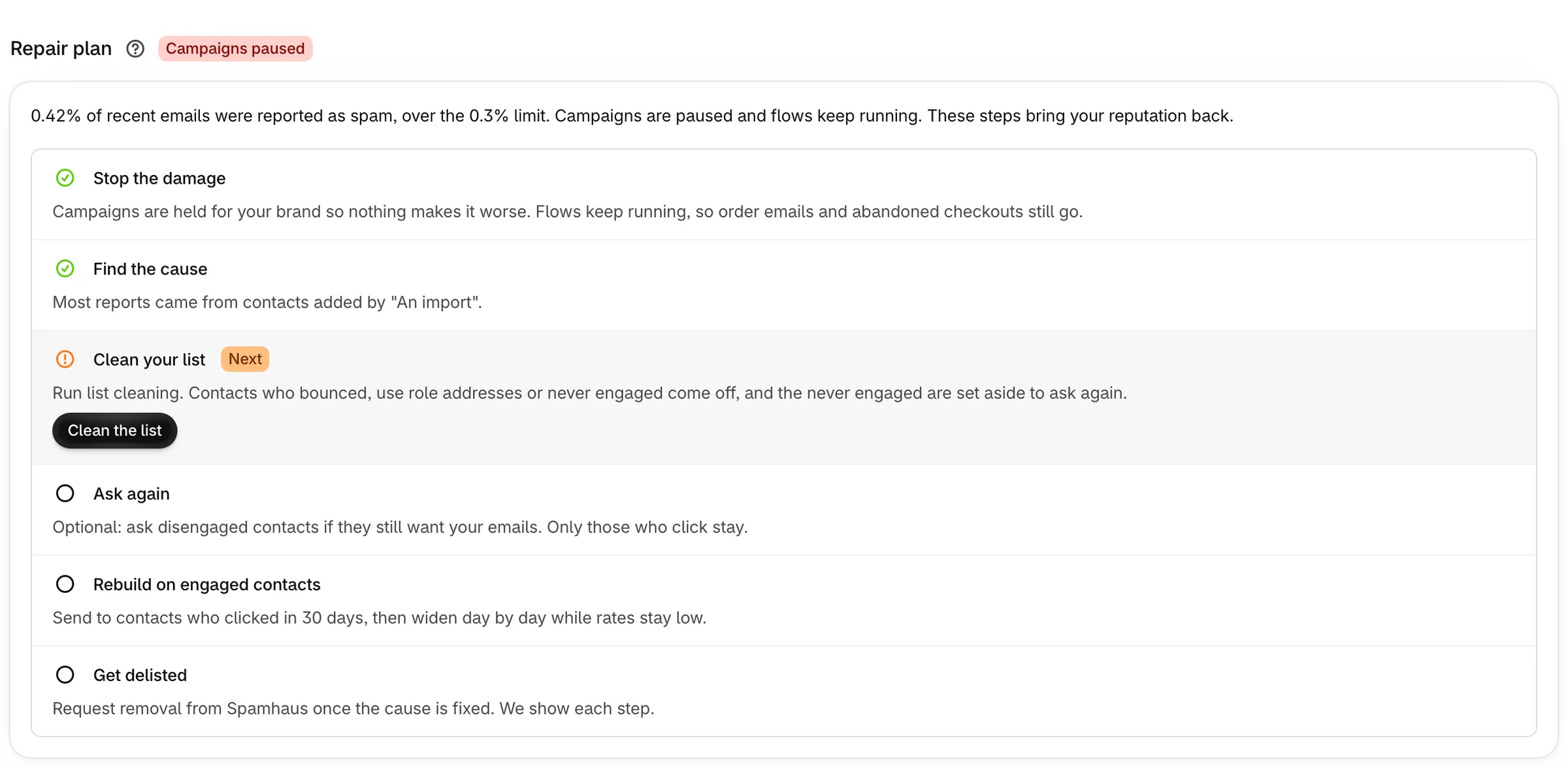
The plan opens with what happened, such as "0.42% of recent emails were reported as spam, over Gmail's 0.3% limit." Flows keep running the whole time.
Stop the damage
Done for you. Campaigns and series are held for your brand so nothing makes it worse. Flows, such as order emails and abandoned checkouts, still go.
Find the cause
Done for you. The plan names where the trouble came from, such as a form or an import. If no single source stands out, Rates by who you mail further down the page shows where to look.
Clean your list
Select Clean the list. Scan your list, then set aside contacts who bounced, use shared inboxes or never engaged. Enable Ask the not-engaged contacts first to keep them for the next step. See Clean your list.
This step has to be done before sending starts again, so the people who caused the trouble aren't mailed again.
Ask again (optional)
Select Write the email to make a check-in campaign from the "Still want our emails?" template, which asks if they still want to hear from you. It goes only to the not-engaged contacts the cleaning kept aside, and its audience can't be changed. It opens in the campaign builder. Check it, then send it: this one campaign goes out even while campaigns are held, once per plan. A week after it goes, anyone it was for who didn't click or order is set aside, and the rest stay. Select Skip this step if you'd rather not ask.
Rebuild on engaged contacts
Select Start sending again. The hold lifts, and campaigns go only to your most engaged contacts, under a daily cap, widening a step after each good day:
| Campaigns go to | Daily cap |
|---|---|
| People who clicked in the last 30 days | A quarter of your usual day |
| People engaged in the last 60 days | Half of your usual day |
| People engaged in the last 90 days | Three quarters of your usual day |
| People engaged in the last 180 days | Your usual day |
Your usual day is your average day of campaign mail in the 30 days before the trouble, and never less than 500.
- A good day is under 0.1% spam reports and under 2% bounces, with at least 100 emails delivered. It moves you up a step the next day.
- A bad day moves you back a step.
- A quiet day, with too little mail to judge, changes nothing.
Series emails follow the same steps. The plan shows where you are, such as "Campaigns now go to contacts engaged in the last 60 days, up to 3,000 emails a day." People outside today's step are left out of that campaign. People inside it but over today's cap wait for tomorrow.
A week of good days at the last step and you're back to normal sending. The plan closes, and your score recovers as the bad days drop out of the last 30.
Campaigns that were paused by the hold stay paused. Open each one and select Resume; during the rebuild it goes only to the people the current step allows.
Get delisted
Only when a blocklist has your domain. Fix the cause first, then ask for removal: Check Spamhaus opens Spamhaus's lookup, and Microsoft delisting opens Microsoft's form for Outlook and Hotmail. See Blocklists and getting delisted.
What we never do
We never move a brand to a fresh domain or IP to get around a bad reputation. Mailbox providers and blocklists treat that as evasion, and it would put every other brand on our sending network at risk. The repair plan is how a reputation comes back.
If your sending domain was paused because too much mail went to addresses that don't exist, clean your list and then email support@attravo.io to resume.
Was this helpful?
More in Deliverability
- Understand your deliverability scoreHow the 0 to 100 score is built from six parts, and how to read your rates by mailbox provider and by who you mail.
- Alerts and campaigns on holdWhat you're told when spam reports, bounces, a blocklist or a paused domain cross a line, and what stops until it's fixed.
- Authentication and your own sending domainSend from your own domain with two DNS records and a recommended DMARC record, and read your SPF, DKIM and DMARC results on Deliverability.
- Blocklists and getting delistedWhich lists Attravo checks your domains against, what happens when one is listed and how to ask for removal.