Why emails bounce or are delayed
What each bounce and delay reason means, what Attravo does about it on its own and what you should do.
 Attravo TeamUpdated 3 min read
On this page
Not every email arrives. Some bounce for good, some are refused for now and tried again, and a few are never sent because the address already bounced or reported spam. Deliverability groups every one by its cause and says what to do about it.
Three ways an email fails to arrive
On a campaign report, Delivery splits emails that didn't arrive three ways, and Not delivered adds them up:
| Line | What it means |
|---|---|
| Bounced | The receiving server said no for good, usually because the address doesn't exist. |
| Refused for now | The receiving server turned it away this time, such as a full mailbox or a provider slowing you down. |
| Dropped before sending | Never sent, because the address already bounced or reported spam, or your sending domain is paused. |
Emails that didn't arrive are never billed.
Read the reasons
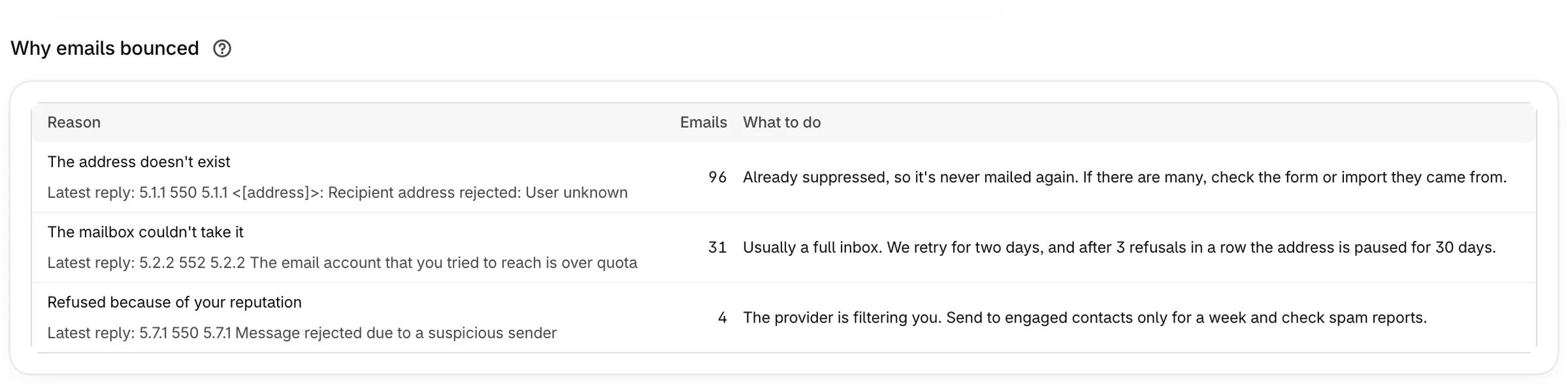
Open Deliverability. Why emails bounced and Why emails were delayed list each cause with how many emails it affected, the Latest reply from the receiving server, and What to do. Pick 7 days, 30 days or 90 days above the rates to change the period.
| Reason | What to do |
|---|---|
| The address doesn't exist | We already stopped emailing it, so it's never mailed again. If there are many, check the form or import they came from. |
| The mailbox couldn't take it | Usually a full inbox. We retry for two days, and after 3 refusals in a row the address is paused for 30 days. |
| Refused because of your reputation | The provider is filtering you. Send to engaged contacts only for a week and check spam reports. |
| Refused for its content | Run the inbox test and check the links and size of the email. |
| Too much at once | The provider wanted mail slower. Spreading a campaign over a few hours sends it gently. |
| A network or server problem | Nothing to do. We retry on our own. |
| Something else | Rare. If it keeps happening, send us the latest reply and we'll look. |
What happens on its own
- A bounce for good stops the app emailing the address at once, and it's never emailed again. The customer's consent in your store stays as it is.
- A refusal is tried again for up to two days. A delivery clears the count. After 3 refusals in a row, the address is paused for 30 days, then tried again.
- A delay is a provider asking us to try later. We do, for up to two days.
Contacts show as Bounced in Audience, and your list's Set aside count includes them.
When bounces run high
Bounces under 2% are healthy. Over 2% opens a warning, and over 5% holds campaigns for your brand. See Alerts and campaigns on hold.
- Find the source. On Deliverability, open Rates by who you mail and choose How they joined. A form or an import with a high bounce rate stands out.
- Clean your list. A scan finds addresses that can't receive mail, throwaway inboxes, typos such as gmial.com, and domains that take no mail, before you send to them. See Clean your list.
- Check your forms. Forms already refuse throwaway domains and domains that take no mail. If one form still brings in bad addresses, enable double opt-in for it. See Use double opt-in and keep proof of consent.
- Bring over your old bounces and unsubscribes. If you moved from another tool, import who bounced there so you don't mail them again. See Move from another email tool.
When one provider delays you
Many delays from one provider mean it's slowing you down. Check By mailbox provider: if one row's Delayed rate is high, send to your most engaged contacts first that week, and spread big campaigns over a few hours. See Understand your deliverability score.
Still seeing a reason you can't explain? Email support@attravo.io with the Latest reply shown beside it.
Was this helpful?