Read your analytics
See email's share of store revenue, what campaigns and flows earned, list growth and form results for any period.
 Attravo TeamUpdated 3 min read
On this page
Analytics shows what email earned for your store and where it came from, for any period you pick. Every number shows its % change against an earlier period, judged the right way around: a falling spam rate shows as good news. With nothing earlier to compare, it says No earlier period.
Pick a period
Under Date range, choose Last 7 days, Last 30 days, Last 90 days, Last 12 months, This month, Last month or Custom dates. Under Compare with, choose the Previous period, the Same period last year, or No comparison. Days follow your store's own calendar and time zone.
Revenue
- Share of store revenue from email: email revenue as a share of all your store's sales, over time.
- Email revenue by source: what campaigns and flows each earned in the period.
How an order is credited to an email is in How Attravo counts revenue.
The rates at a glance
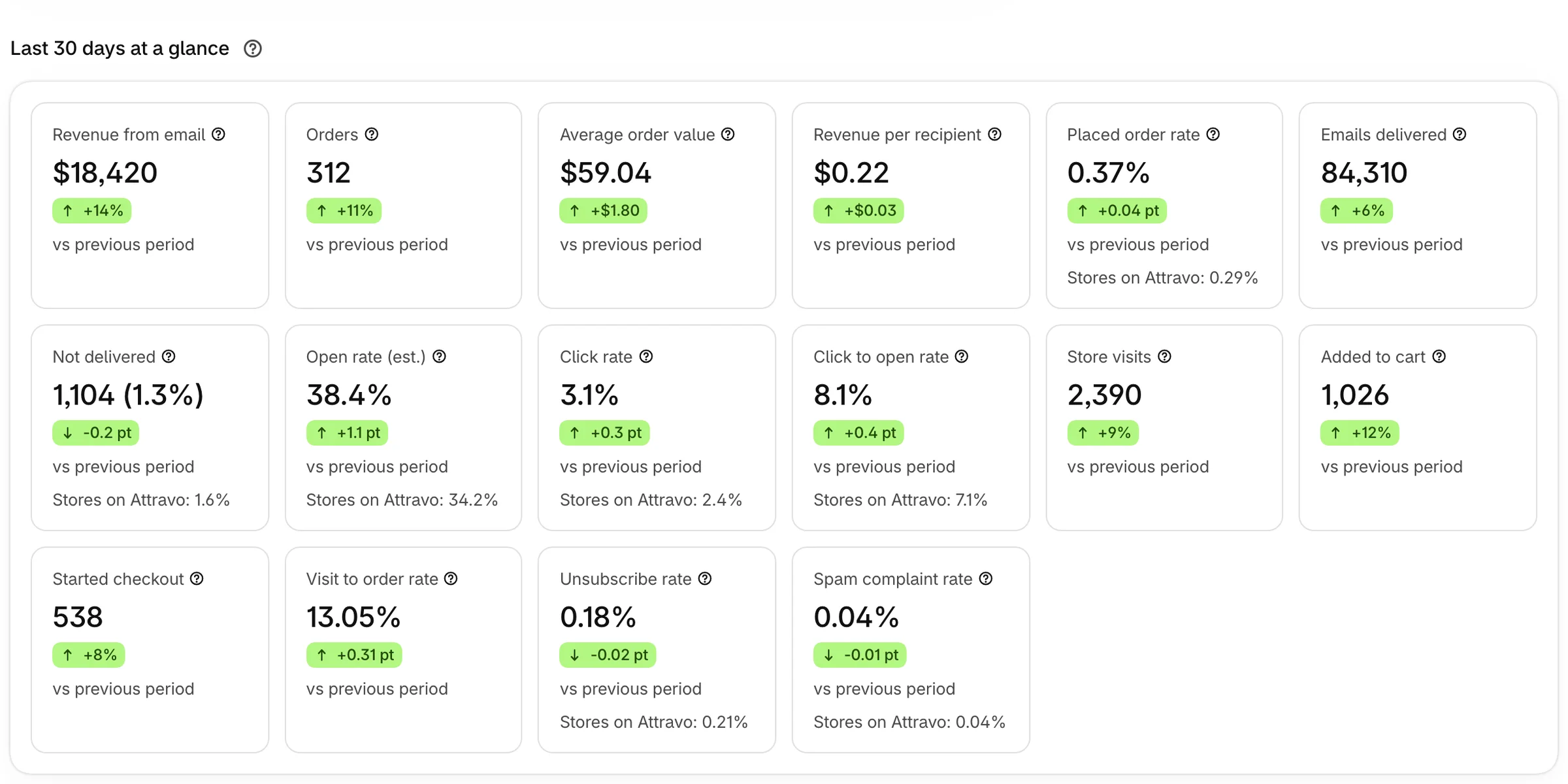
The rates for every email sent in the period, campaigns and flows together: revenue, orders, average order, revenue per recipient, placed order rate, emails delivered, not delivered, open rate, click rate, click to open rate, store visits, added to cart, started checkout, visit to order rate, unsubscribe rate and spam complaint rate. Each is explained in Read a campaign report.
Open rates leave out Apple Mail's automatic opens, so they're lower than in tools that count them, and closer to how many people really read.
Against stores on Attravo
Under a rate you may see a line such as "+12% vs stores on Attravo". It is your rate as a % change from the median of that rate across stores on Attravo over their last 30 days. Only stores with at least 1,000 delivered emails count, and nothing shows until there are at least 10 of them, so no single store's numbers can be read back out. It covers rates only, since money is in each store's own currency.
From inbox to order
The funnel shows how many people opened, clicked, visited your store, added to cart, started checkout and ordered, out of everyone your emails reached. See Store visits and checkouts after a click.
List growth
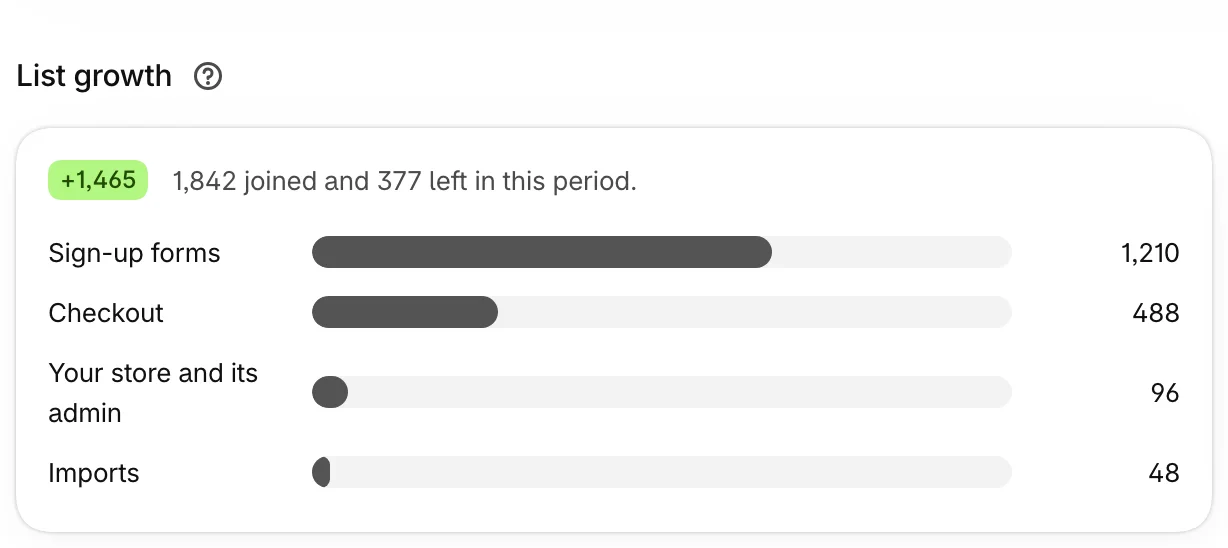
- List growth: how many joined and left in the period, and Where new subscribers came from: Sign-up forms, Checkout, Your store and its admin or Imports. Only people who agreed to marketing emails count.
- How people unsubscribed: The unsubscribe link, Their mail app's unsubscribe button, Marked as spam, or Your store and its admin. A rise in spam reports means people can't find the unsubscribe link, or are getting more email than they want.
Sign-up forms
Every form's views, sign-up rate, new subscribers and what those subscribers spent in the period, with a line summing them all. Select a form for its own report.
By campaign and flow
Every campaign and flow side by side, ranked by revenue, with recipients, open rate, click rate, order rate, revenue per recipient and revenue. Revenue per recipient is the fairest way to compare a big send with a small one. The line under the table says how revenue was counted.
Flow and series reports
Open a flow or series and select Report for:
- What it earned: the same numbers as a campaign, for the period you choose.
- Revenue by day and the funnel.
- Step by step: how many reached each step, and for each email its sent count, rates, visits, orders, average order, revenue per recipient and unsubscribe rate. Skipped means a rule held an email back, such as smart sending.
- Orders it brought in, with the step each order came from.
- People: everyone who came in, by where they are now: In it now, Finished, Left early, or Held while paused. Latest to come in lists the newest.
The Cash on delivery confirmation flow adds Cash on delivery answers: how many buyers confirmed and how many asked to cancel.
Was this helpful?
More in Analytics and reports
- Read a campaign reportWhat every number on a campaign report means, from revenue per recipient to emails not delivered.
- How Attravo counts revenueWhen an order counts as an email's sale, how refunds and cancellations come off, and how to change the window.
- Store visits and checkouts after a clickHow the storefront pixel counts what people do after clicking, and how shoppers' privacy choices shape it.