Understand your deliverability score
How the 0 to 100 score is built from six parts, and how to read your rates by mailbox provider and by who you mail.
 Attravo TeamUpdated 3 min read
On this page
Your deliverability score says how mailbox providers treat your mail, from 0 to 100. Nothing about it is hidden: Deliverability lists every part, your number for it, the healthy line and its weight.
How the score is built
The score reads your last 30 days. Each part scores full marks on the healthy side of its line, nothing at its limit, and falls in a straight line between the two.
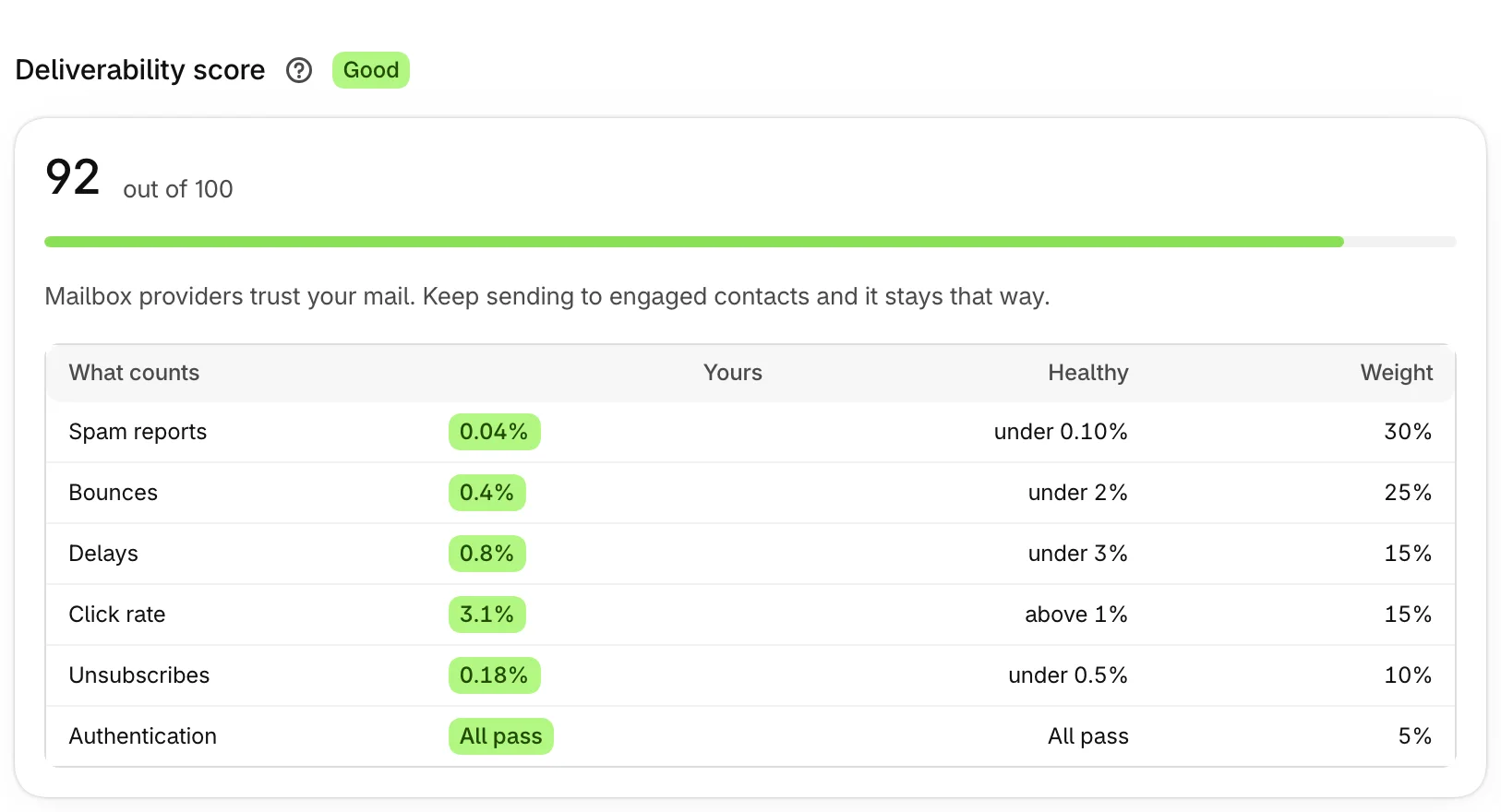
| Part | Healthy | Scores nothing at | Weight |
|---|---|---|---|
| Spam reports | under 0.1% | 0.3% | 30 |
| Bounces | under 2% | 5% | 25 |
| Delays | under 3% | 10% | 15 |
| Click rate | above 1% | 0.2% | 15 |
| Unsubscribes | under 0.5% | 1.5% | 10 |
| Authentication | All pass | 5 |
Spam reports, click rate and unsubscribes are shares of delivered emails. Bounces and delays are shares of emails handed over for delivery. Authentication passes once your sending domain has a DMARC record and isn't paused.
Read the grade
| Grade | Score | What it means |
|---|---|---|
| Good | 85 and up | Providers trust your mail. Keep sending to engaged contacts. |
| Fair | 65 to 84 | One part is slipping. The line under the score names it and what to do. |
| Needs repair | under 65 | Some mail is likely landing in spam. Act on the weakest part now. |
| New | Fewer than 1,000 emails delivered in 30 days. |
Your score appears after 1,000 delivered emails, so it reflects how providers treat you and not a handful of sends. Until then the page shows how many you've delivered so far.
The line under the score always names the part costing you most, with the fix: for example, "Bounces are above the healthy line. Clean your list and check where new contacts come from." Home shows the score too, with where you send from and your spam and bounce rates.
Rates by mailbox provider
Gmail, Outlook, Yahoo and Apple each filter on their own, and trouble usually starts with one of them. By mailbox provider splits your mail into Gmail, Outlook and Hotmail, Yahoo and AOL, Apple iCloud, and everyone else. A company address on Google's mail servers counts as Gmail, since that's who filters it.
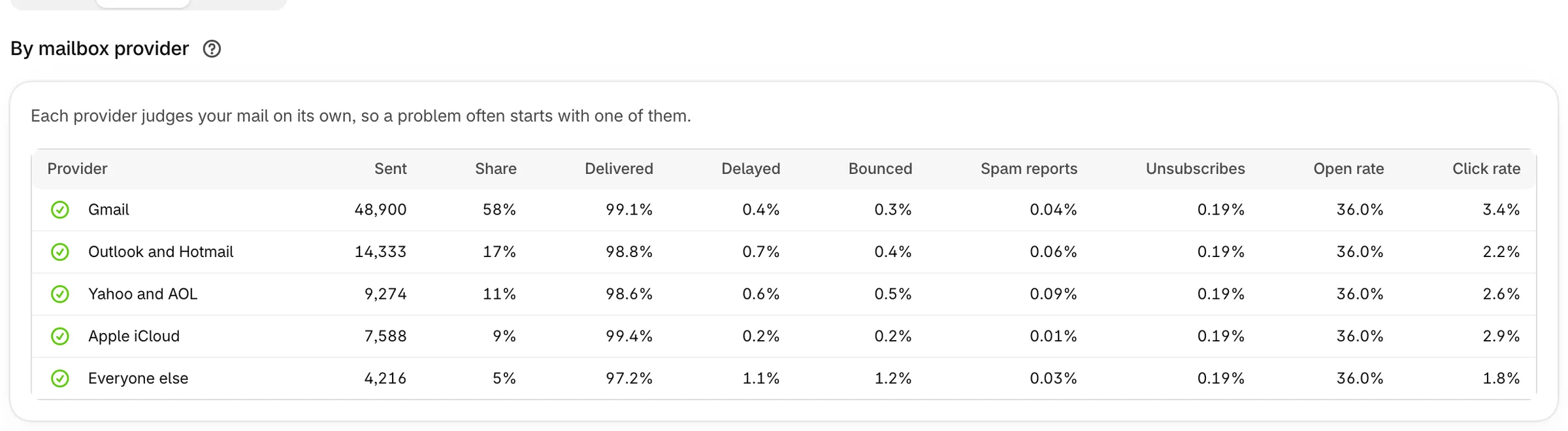
Each row shows Sent, Share, Delivered, Delayed, Bounced, Spam reports, Unsubscribes, Open rate and Click rate, with a mark where a rate is off. Pick 7 days, 30 days or 90 days above the table. The picker covers the rates, the trend and the reasons; the score always reads 30 days.
Rates by who you mail
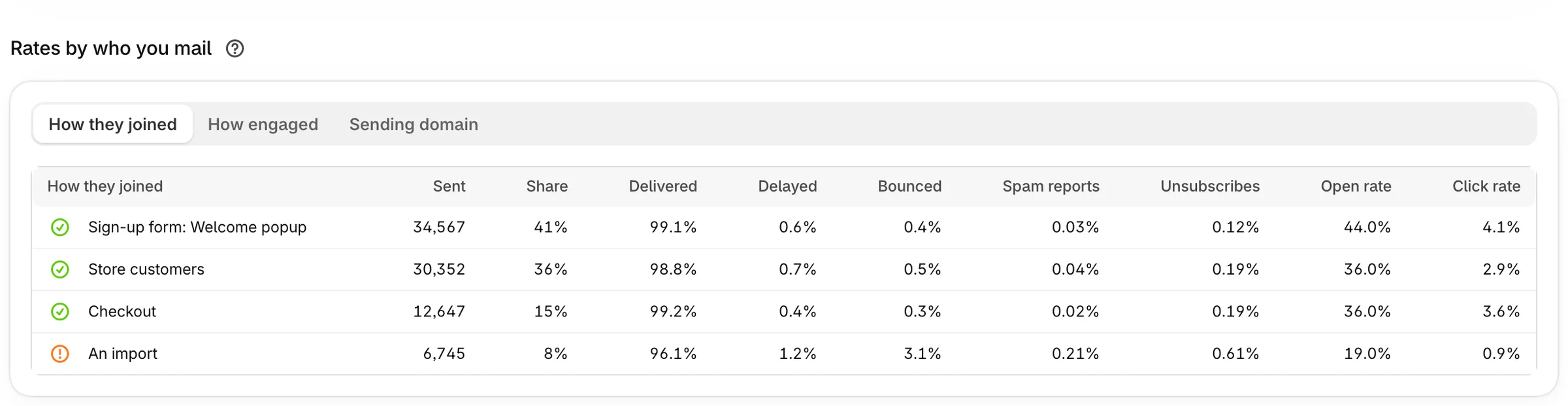
Rates by who you mail shows the same rates three more ways. When numbers turn bad, this shows where it starts.
- How they joined: store customers, checkout, an import, or each sign-up form by name. A form that brings in bouncing or complaining addresses stands out here.
- How engaged: Engaged in 30 days, Engaged in 31 to 90 days, Engaged in 91 to 180 days and Not engaged in 180 days. Spam reports almost always come from the last two.
- Sending domain: each domain you sent from.
Spam reports by day
Spam report rate by day charts the share of delivered emails reported as spam each day. Gmail and Yahoo start filtering senders above 0.3%. Aim for under 0.1%.
The rest of the page
- Inbox test: sends a real email to a test inbox and checks SPF, DKIM, DMARC and a spam filter score. Select Run the inbox test.
- Authentication and Blocklists. See Authentication and your own sending domain and Blocklists and getting delisted.
- Why emails bounced and Why emails were delayed. See Why emails bounce or are delayed.
When a rate crosses a line, alerts lead the page. See Alerts and campaigns on hold.
Was this helpful?
More in Deliverability
- Alerts and campaigns on holdWhat you're told when spam reports, bounces, a blocklist or a paused domain cross a line, and what stops until it's fixed.
- Follow the repair planThe six steps that bring your sending reputation back after spam reports or bounces run high, and how sending restarts.
- Authentication and your own sending domainSend from your own domain with two DNS records and a recommended DMARC record, and read your SPF, DKIM and DMARC results on Deliverability.
- Blocklists and getting delistedWhich lists Attravo checks your domains against, what happens when one is listed and how to ask for removal.