Bundles don't show on my store
Work through these checks when a bundle or offer is missing from your storefront.
 Attravo TeamUpdated 1 min read
On this page
Go through these checks in order. Most missing bundles come down to the first three.
1. The app embed is on
Every bundle needs the Bundles Core Script app embed. In Shopify admin, go to Online Store > Themes, click Customize, open App embeds and make sure Bundles Core Script is on, then click Save.
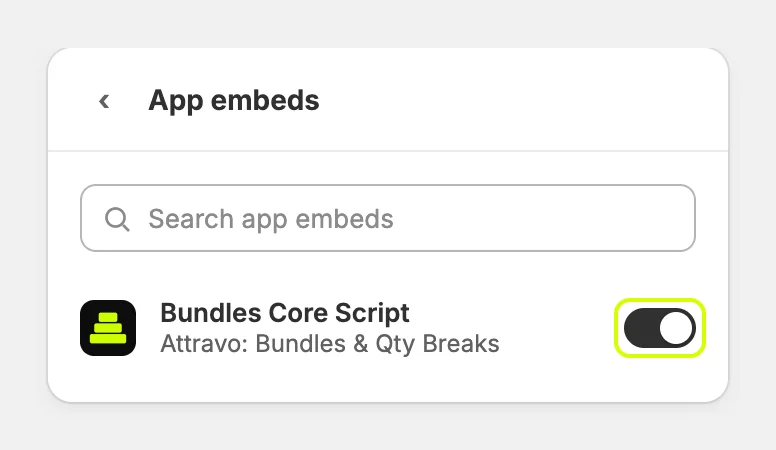
App embeds are set per theme. If you recently switched themes, turn it on in the new one.
2. The bundle is active
In the app, open the bundle and check that Status is Active, then click Save. Drafts and archived bundles are hidden from shoppers.
3. The page has the right block
- On your bundle page, the template needs the Bundle Page block. See Publish a bundle page.
- On product pages, the product template needs the PDP Bundle Box block. See Add bundles to product pages.
4. The offer covers the product
For quantity breaks:
- Check Offer eligibility in the offer. The product must be included and not excluded.
- Packs on product pages need Also show packs on product pages turned on.
- The dropdown on product cards needs cards with a quantity box and an add to cart button.
5. The plan allows it
On the Free plan, BOGO bundles don't show, and only 3 bundles can be active. See Plans and pricing.
6. Give it a few minutes
Your storefront picks up changes within about 3 minutes. Reload the page after that.
Still missing?
Contact us at attravo.com/contact or book a free call at calendly.com/attravo/discovery, and tell us the page where the bundle should appear.
Was this helpful?
More in Troubleshooting
- A bundle step shows no productsWhy a Mix & Match step can go empty, how the app warns you, and how to fix it.
- The discount doesn't apply at checkoutFind out why a bundle's discount is missing at checkout, and how to restore it.
- Use the app with other apps and themesHow the app works alongside your theme, review apps, discount apps and cart apps.
- Common questions about Attravo BundlesQuick answers about discounts, themes, stock, plans and getting help.