Read your dashboard
What each number on the Dashboard means, how it's counted, and where to find your latest bundle orders.
 Attravo TeamUpdated 1 min read
On this page
The Dashboard shows how your bundles did over the last 30 days, with your newest bundle orders below. It's on every plan.
The four numbers
- Total revenue: revenue from the bundles in orders placed in the last 30 days.
- Bundle orders: orders from the last 30 days that included a bundle. An order with two different bundles counts once for each.
- Active bundles: bundles set to Active right now. Drafts and archived bundles aren't counted.
- Conversion rate: bundle orders for every 100 shopper visits that included an offer, over the last 30 days. A visit ends after 30 minutes without activity.
Hover the info icon beside a number to read its definition. The 30 days run up to now, and amounts use your store's money format.
Recent bundle orders
Recent bundle orders lists your 10 newest orders that included a bundle, with the Bundle, its Type, the number of Items, the Revenue and the Date in your store's time zone.
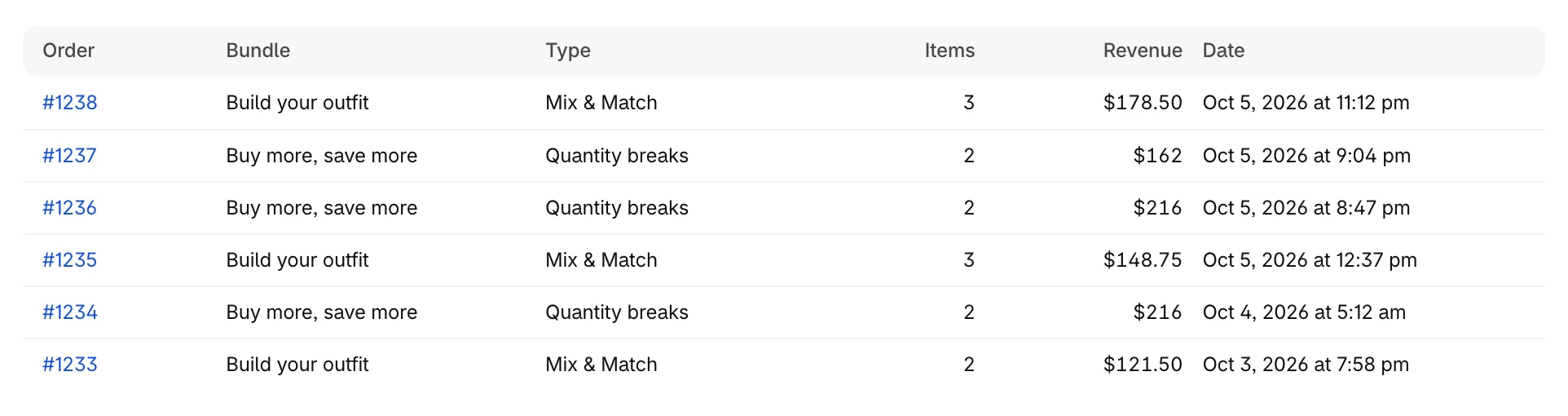
Click an order number to open the order in Shopify.
More detail
The Analytics page breaks your results down by bundle and by day, over a range you choose. It's part of Pro. See Read your analytics.
Was this helpful?