Change or cancel your plan
Move to another plan from Attravo, see what a smaller plan would switch off, or cancel.
 Attravo TeamUpdated 1 min read
On this page
Plans are billed on your Shopify invoice and changed in your store admin, so there is no card to enter in Attravo. A change shows on your next Shopify invoice.
Upgrade
- Open Plans and, under Compare plans, select Upgrade under the plan you want.
- Shopify's plan selection opens. Approve the plan there.
Paused offers start again as soon as the new plan's included revenue covers what you have earned this period.
Downgrade
- Open Plans and select Downgrade under the plan you want.
- Attravo shows what changes for your store on the smaller plan: funnels that would stop showing, steps past the new limit, A/B tests, and translations.
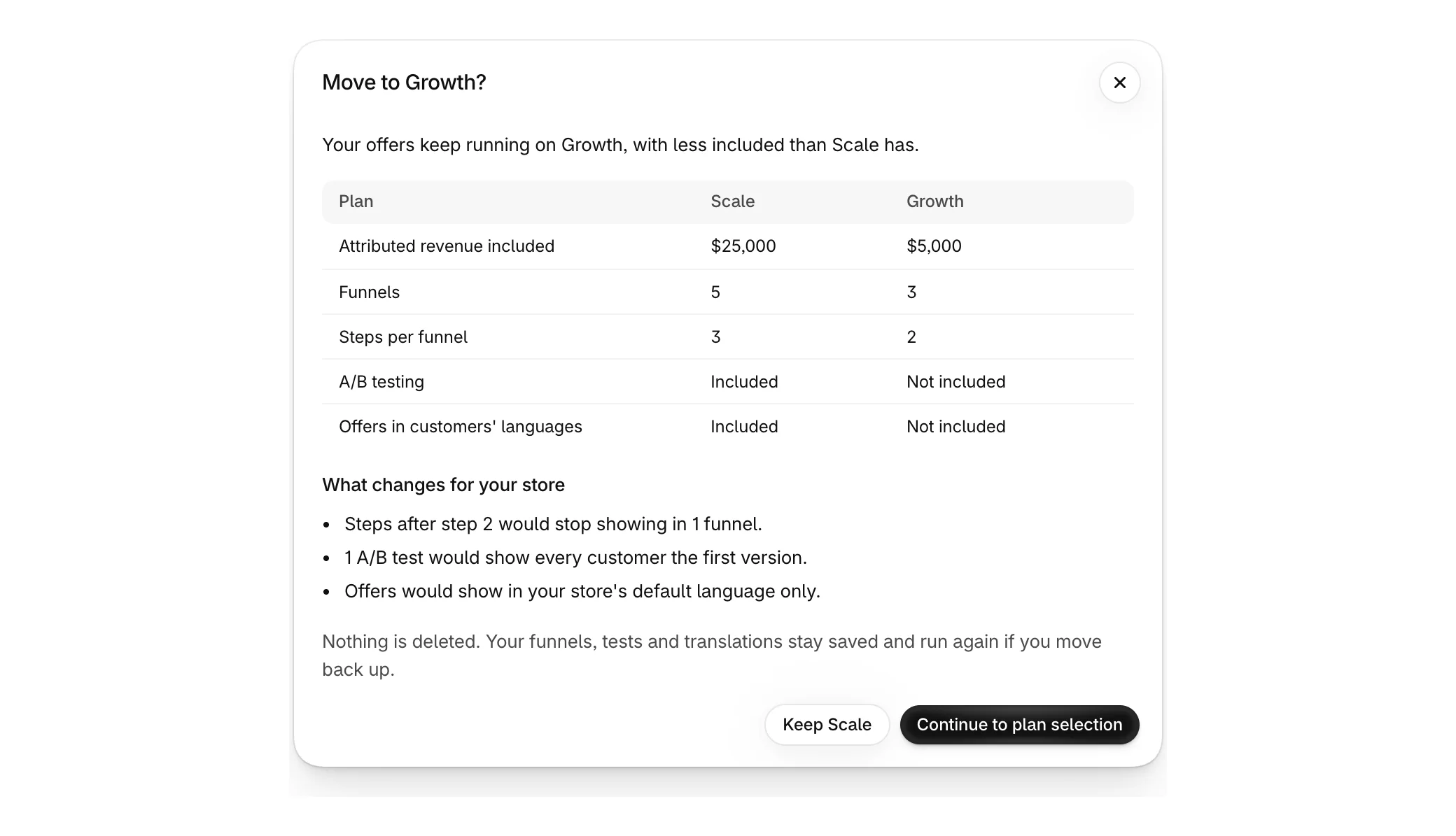
- Select Continue to plan selection to go ahead, or keep your current plan.
Nothing is deleted. Funnels, tests and translations stay saved and run again if you move back up. Live funnels past the new limit stop showing, and Manage priority on Funnels decides which keep running.
Cancel
Move to the Free plan in your store admin. Nothing more is charged and your funnels are kept.
Uninstalling also stops every charge, but it deletes your funnels and their data. See Uninstall Attravo.
Need help choosing?
On Plans, Book a discovery call books a free call with our team, or email support@attravo.io.
Was this helpful?
More in Plans and billing
- Choose a planCompare Free, Growth, Scale and Enterprise, and see how included revenue works.
- When offers pause at your plan's included revenueWhat happens when your offers earn more than your plan includes, and how to start them again.
- Uninstall AttravoWhat uninstalling removes, what stays on your orders, and how to keep your funnels instead.