Install Attravo
Install Post Purchase Upsell from the Shopify App Store and finish its one-page welcome.
 Attravo TeamUpdated 1 min read
On this page
Attravo shows offers after checkout and adds what a customer accepts to the order they just placed, so an order can grow without a second checkout. Installing changes nothing your customers see until you build and activate a funnel.
Install the app
- Open the listing at https://apps.shopify.com/attravo-post-purchase-upsell and select Install.
- Review the access Attravo asks for, then confirm the install.
Attravo opens in your Shopify admin, under Apps.
Complete the welcome
The first time you open Attravo, it greets you with your store's name, country and currency, read from your store. There is nothing to type here.

- Check Contact email. Attravo uses it to contact you about your account. Leave it as it is to use your store's address.
- Choose how Show Attravo in works. Follow my store admin keeps Attravo in your admin's language.
- Select Start building.
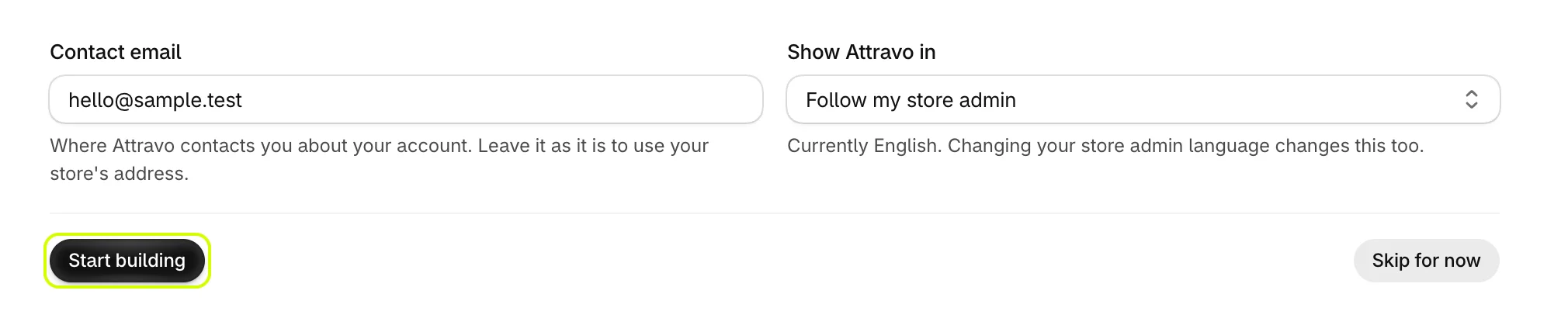
Skip for now takes you to Home without saving either field. Both can be changed later in Settings.
Next
Home opens with a setup guide that checks each step for you. Follow it in Finish the setup guide.
Was this helpful?
More in Getting started
- Finish the setup guideWork through the setup guide on Home until your first offer is live for customers.
- Create your first funnelPick a template, choose the product it offers, and activate your first funnel.
- Turn on Core Script in your themeTurn on the Core Script app embed so Attravo can confirm it is installed and read your theme's fonts and colours.
- Add the Upsell Offer block to your pagesPlace the Upsell Offer block on the thank you and order status pages so your funnels can show there.