Choose which funnel runs first
Set the priority order that decides which funnel a customer sees when more than one could match.
 Attravo TeamUpdated 1 min read
When several funnels could show on the same page, Attravo checks them from the top of the list and shows the first one the order matches. Priority lets you put your best offer first.
How Attravo picks a funnel
On each page, Attravo goes down the list of live funnels and shows the first one that:
- runs on that page, and
- matches the order, for example its order total rules.
Each page shows one funnel. A funnel that finished for an order never shows again on that order, so a different funnel can still run on a later page. A funnel a customer is part way through carries on, even on a page it does not list.
Change the order
- On Funnels, select Manage priority. Each row shows its position, with Move up and Move down.
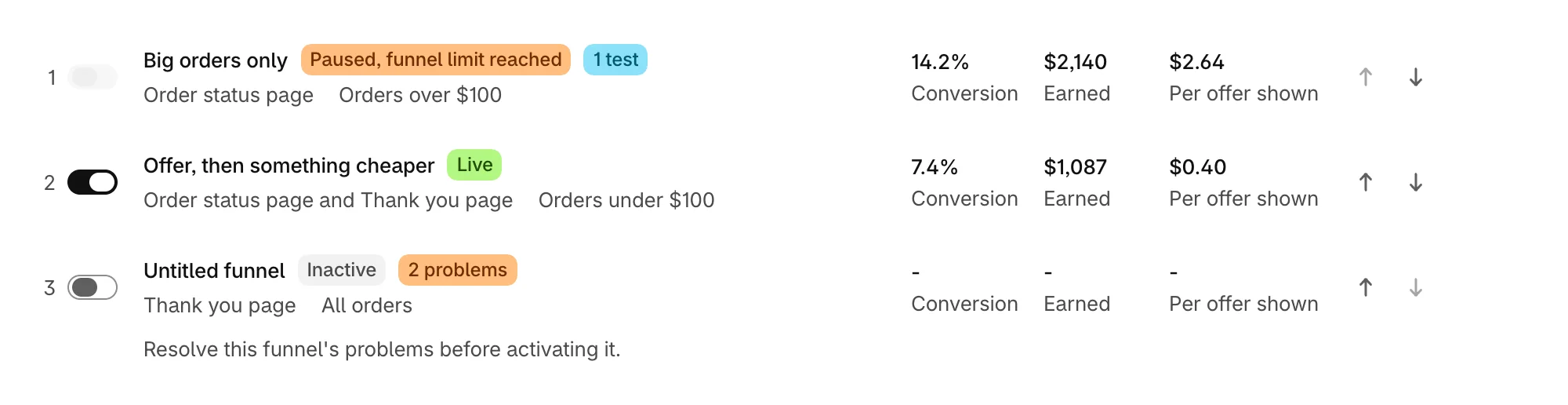
- Move funnels into the order you want.
- Select Done, then Save in the bar at the top of the admin.
Filters, search and sort are set aside while you arrange, so every funnel is listed. New and duplicated funnels are added at the top.
Priority and your plan
Your plan decides how many live funnels are shown: Free shows one, Growth three and Scale five. Attravo shows them from the top of the list, so after moving down a plan, priority decides which keep running. The rest show Paused, funnel limit reached until you move up or switch some off.
Was this helpful?
More in Funnels
- Choose a funnel templatePick the funnel shape that fits your products, from a single offer to an upgrade after a yes.
- Manage your funnelsFind, switch on, duplicate and delete funnels from the Funnels list, and read what each row tells you.
- Build a multi-step funnelFollow a yes with an upgrade and a no with a cheaper offer, and see the whole path as a flow.
- Choose where a funnel runs and who sees itPick the pages a funnel appears on and the order totals it is shown for.