Offer add-ons like gift wrap
Add tick boxes to the cart that add a real product, such as gift wrap or a card, priced from your store.
 Attravo TeamUpdated 1 min read
On this page
An add-on is a tick box in the cart that adds a small extra to the order, such as gift wrapping. Because each one is a real product in your store, its price, stock and tax work like any other product's.
Create the product
In your Shopify admin, create a product for the add-on, such as Gift Wrap, with its price. Make it active on your Online Store.
Add it to the cart
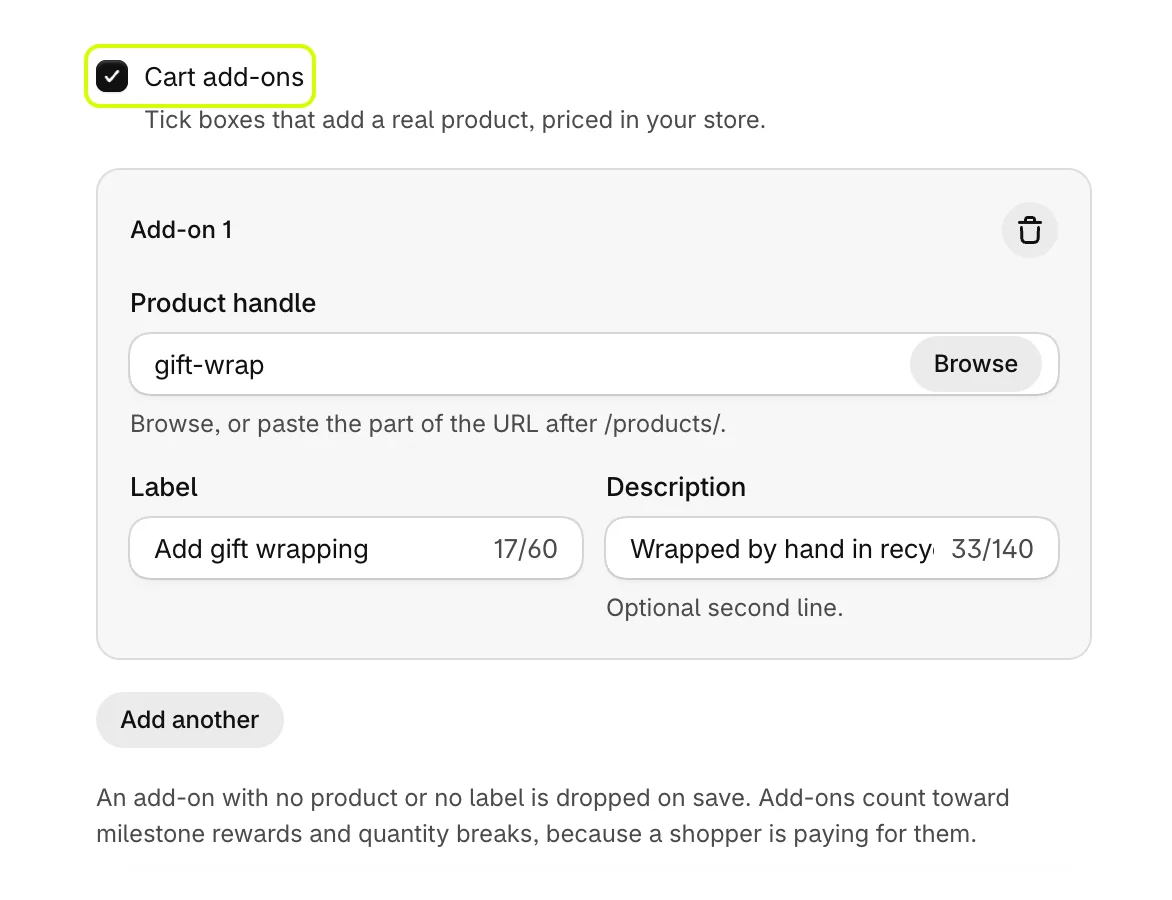
- On Cart settings, open General and turn on Cart add-ons.
- Under Add-on 1, select Browse beside Product handle to pick the product, or paste the part of its address after
/products/. - Set Label, the text beside the tick box, such as Add gift wrapping.
- Set Description if you want a second line under it.
- Select Add another for more. You can offer up to four.
- Select Save.

When a shopper ticks the box, the product is added to the cart at its price. Unticking it takes it off again.
Good to know
- An add-on with no product or no label is dropped when you save.
- Add-ons count toward reward goals and quantity breaks, because the shopper is paying for them.
- To remove an add-on, select the bin at the top of its box, then save.
Was this helpful?
More in Offers and rewards
- Recommend products in the cartShow products to add in one tap, from a collection you choose or ones that pair with the cart, with an optional discount.
- Set up the free shipping barShow shoppers how far they are from free shipping, apply it at checkout when they get there, and raise your average order.
- Add more reward goalsStack goals on the reward bar, such as free shipping first and a free gift after it, or a percent or amount off the order.
- Give free gifts with an orderAdd a free gift to every order, or only when the cart holds products you choose, and checkout takes its price off.