Show the reward bar on product pages
Put a slim reward bar at the bottom of every product page, so shoppers see how close they are before they open the cart.
 Attravo TeamUpdated 1 min read
On Pro, the reward bar can also sit at the bottom of every product page. A shopper deciding on a product sees how much more would earn free shipping or a gift, before they open the cart.
Turn it on
- Set up at least one reward goal. See Set up the free shipping bar.
- On Cart settings, open Product-page reward bar.
- Turn on Reward bar on product pages.

- Select Save.
The bar shows the same message as the cart, and updates as products are added:
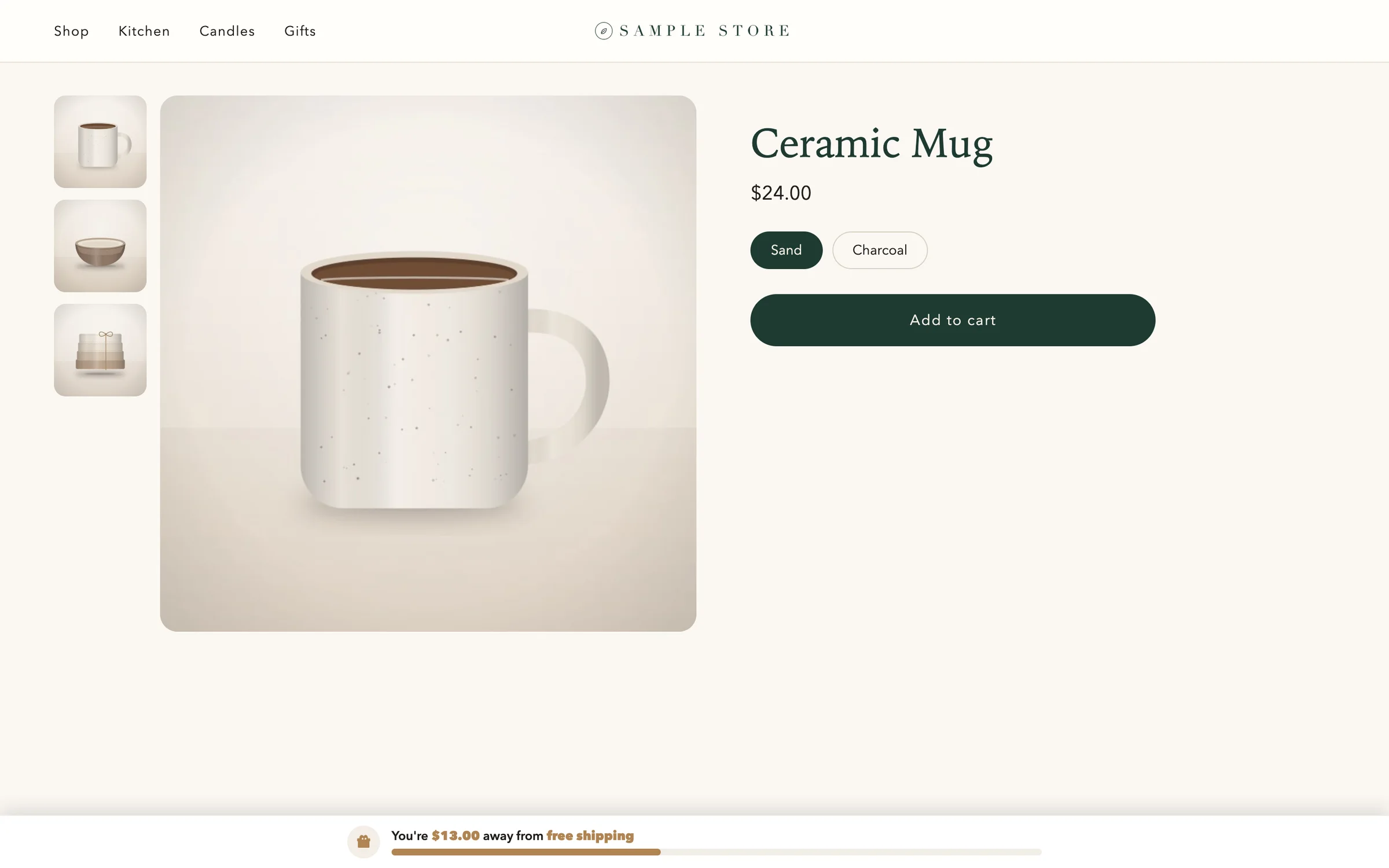
Its colors follow the cart's Reward and Background colors. See Match the cart to your brand colors.
Was this helpful?
More in Offers and rewards
- Recommend products in the cartShow products to add in one tap, from a collection you choose or ones that pair with the cart, with an optional discount.
- Set up the free shipping barShow shoppers how far they are from free shipping, apply it at checkout when they get there, and raise your average order.
- Add more reward goalsStack goals on the reward bar, such as free shipping first and a free gift after it, or a percent or amount off the order.
- Give free gifts with an orderAdd a free gift to every order, or only when the cart holds products you choose, and checkout takes its price off.